Varying Fracface Pressure
More advanced use of bluebonnet.flow in a project where pressure variation at the frac-face or bottom-hole is approximately known.
%load_ext autoreload
%autoreload 2
import numpy as np
import pandas as pd
import matplotlib.pyplot as plt
from scipy import interpolate

from bluebonnet.flow import FlowProperties, SinglePhaseReservoir
from bluebonnet.fluids import build_pvt_gas
from bluebonnet.forecast.forecast_pressure import (
    fit_production_pressure,
    plot_production_comparison,
)
from bluebonnet import plotting
pressure_initial = 12_000.0
pressure_fracface = 5_000.0

n_times = 1_000
t_end = 20
time = np.linspace(0, np.sqrt(t_end), n_times) ** 2
pressure_v_time = np.full(n_times, pressure_fracface)
pressure_v_time[n_times // 4 : n_times // 2] /= 2.0
pressure_v_time[n_times // 2 :] /= 4.0

pvt_gas = pd.read_csv("../tests/data/pvt_gas.csv").rename(
    columns={
        "P": "pressure",
        "Z-Factor": "z-factor",
        "Cg": "compressibility",
        "Viscosity": "viscosity",
    }
)
flow_properties = FlowProperties(pvt_gas, pressure_initial)
pseudopressure_fracface = flow_properties.m_scaled_func(pressure_fracface)
pseudopressure_initial = flow_properties.m_scaled_func(pressure_initial)

print("mf =", flow_properties.m_scaled_func(pressure_fracface))

res = SinglePhaseReservoir(100, pressure_fracface, pressure_initial, flow_properties)

%time res.simulate(time, pressure_v_time)

recovery = res.recovery_factor()


def resource_left(pseudopressure, pvt):
    density = interpolate.interp1d(pvt.pvt_props["m-scaled"], pvt.pvt_props["Density"])
    print(max(pvt.pvt_props["m-scaled"]))
    p = np.minimum(pseudopressure, max(pvt.pvt_props["m-scaled"]))
    return (density(p)).sum(axis=1) / len(pseudopressure[0])


density_interp = interpolate.interp1d(
    flow_properties.pvt_props["m-scaled"], flow_properties.pvt_props["Density"]
)
remaining_gas = (resource_left(res.pseudopressure, flow_properties)) / (
    density_interp(pseudopressure_initial)
)
print(
    f"{pseudopressure_fracface=}",
    res.pseudopressure[-1][0],
    f"Deviation is {(recovery[-1] - 1 + remaining_gas[-1]) / recovery[-1] * 100:3.2g}%",
)
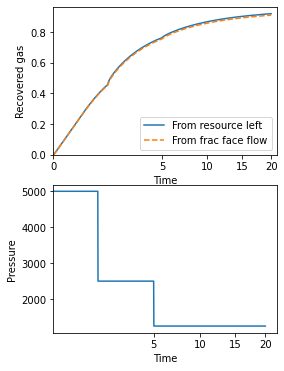
fig, (ax1, ax2) = plt.subplots(2, 1)
fig.set_size_inches(4, 6)
ax1.plot(time, 1 - remaining_gas, label="From resource left")
ax1.plot(time, recovery, "--", label="From frac face flow")
ax1.legend()
ax1.set(
    xlabel="Time",
    ylabel="Recovered gas",
    ylim=(0, None),
    xscale="squareroot",
    xlim=(0, None),
)

ax2.plot(time, pressure_v_time, label="Pressure")
ax2.set(xlabel="Time", xscale="squareroot", ylabel="Pressure");
mf = 0.09720937870967307
CPU times: user 3.08 s, sys: 11.7 ms, total: 3.09 s
Wall time: 3.09 s
0.3642368902150243
pseudopressure_fracface=array(0.09720938) 0.0008833922400551281 Deviation is  -1%
[Text(0.5, 0, 'Time'), None, Text(0, 0.5, 'Pressure')]
Build PVT data
There are two ways to create the necessary pressure-volume-temperature data.
Use the well data and an appropriate equation of state
Pull data from a pre-made csv file.
We will show both with the next code cell.
#
## Using the well data and bluebonnet.fluids
#
play = "HAYNESVILLE SHALE"
field_values = {
    "N2": 0.0,
    "H2S": 0.0,
    "CO2": 0.0002,
    "Gas Specific Gravity": 0.58,
    "Reservoir Temperature (deg F)": 285.21375,
}
gas_dryness = "wet gas"
pvt_gas = build_pvt_gas(field_values, gas_dryness)
# pvt_gas.to_csv("../tests/data/pvt_gas_" + Play + "_" + str(WellNumber) + ".csv")
print(pvt_gas.head())

#
## Using pre-gathered pvt data
#
pvt_gas = pd.read_csv("../tests/data/pvt_gas_" + play + "_20.csv", index_col=0)
pvt_gas
| temperature | pressure | Density | z-factor | compressibility | viscosity | pseudopressure | |
|---|---|---|---|---|---|---|---|
| 0 | 285.21375 | 10.0 | 0.021024 | 0.999592 | 0.100043 | 0.014638 | 0.000000e+00 |
| 1 | 285.21375 | 20.0 | 0.042065 | 0.999181 | 0.050043 | 0.014638 | 2.050874e+04 |
| 2 | 285.21375 | 30.0 | 0.063123 | 0.998775 | 0.033376 | 0.014639 | 5.470201e+04 |
| 3 | 285.21375 | 40.0 | 0.084198 | 0.998370 | 0.025043 | 0.014639 | 1.025897e+05 |
| 4 | 285.21375 | 50.0 | 0.105290 | 0.997967 | 0.020042 | 0.014640 | 1.641813e+05 |
| ... | ... | ... | ... | ... | ... | ... | ... |
| 1394 | 285.21375 | 13950.0 | 17.710554 | 1.655297 | 0.000029 | 0.029885 | 6.092847e+09 |
| 1395 | 285.21375 | 13960.0 | 17.715675 | 1.656005 | 0.000029 | 0.029895 | 6.098487e+09 |
| 1396 | 285.21375 | 13970.0 | 17.720791 | 1.656713 | 0.000029 | 0.029905 | 6.104126e+09 |
| 1397 | 285.21375 | 13980.0 | 17.725903 | 1.657421 | 0.000029 | 0.029915 | 6.109766e+09 |
| 1398 | 285.21375 | 13990.0 | 17.731011 | 1.658128 | 0.000029 | 0.029925 | 6.115405e+09 |
1399 rows × 7 columns
Fit wells
well_number = "20"
prod_file = f"../data/dataset_1_well_{well_number}.csv"
# This file contains pressure and production data. Rows 1 and 2 have information about units, so skip
prod = pd.read_csv(prod_file, skiprows=[1, 2]).rename(
    columns={
        "Time (Days)": "Days",
        "Gas Volume (MMscf)": "Gas",
        "Calculated Sandface Pressure  (psi(a))": "Pressure",
    }
)[["Days", "Gas", "Pressure"]]
# This file contains an estimate of initial pressure. That's all I need it for here.
well_file = f"../data/WellData_{well_number}.csv"
pressure_initial = float(
    pd.read_csv(well_file)
    .set_index("Field")
    .loc["Initial Pressure Estimate (psi)"]
    .iloc[0]
)

result = fit_production_pressure(
    prod,
    pvt_gas,
    pressure_initial,
    n_iter=40,
    pressure_imax=12000,
    filter_window_size=30,
    inplace_max=100000,
)
result
Fit Statistics
| fitting method | Nelder-Mead | |
| # function evals | 101 | |
| # data points | 416 | |
| # variables | 3 | |
| chi-square | 48434965.2 | |
| reduced chi-square | 117275.945 | |
| Akaike info crit. | 4858.65967 | |
| Bayesian info crit. | 4870.75172 |
Variables
| name | value | initial value | min | max | vary |
|---|---|---|---|---|---|
| tau | 827.982319 | 830 | 30.0000000 | 830.000000 | True |
| M | 51957.6360 | 13864.498560000016 | 13850.5730 | 100000.000 | True |
| p_initial | 10389.2303 | 10000.0 | 9539.17738 | 12000.0000 | True |
Plot the result
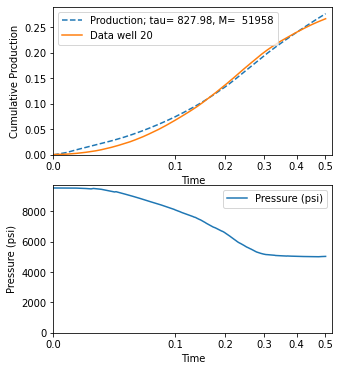
fig, (ax1, ax2) = plot_production_comparison(
    prod,
    pvt_gas,
    result.params,
    filter_window_size=30,
    well_name=f"Data well {well_number}",
)