Varying Fracface Pressure
More advanced use of bluebonnet.flow in a project where pressure variation at the frac-face or bottom-hole is approximately known.
You can download and run this notebook with jupyter by clicking on the “Edit on github” button in the upper right corner. Then, install bluebonnet with
pip install bluebonnet
or inside the notebook with
%pip install bluebonnet
and follow below
import numpy as np
import pandas as pd
import matplotlib.pyplot as plt
from scipy import interpolate

from bluebonnet.flow import FlowProperties, SinglePhaseReservoir
from bluebonnet.fluids import build_pvt_gas
from bluebonnet.forecast.forecast_pressure import (
    fit_production_pressure,
    plot_production_comparison,
)
from bluebonnet import plotting
pressure_initial = 12_000.0
pressure_fracface = 5_000.0

n_times = 1_000
t_end = 20
time = np.linspace(0, np.sqrt(t_end), n_times) ** 2
pressure_v_time = np.full(n_times, pressure_fracface)
pressure_v_time[n_times // 4 : n_times // 2] /= 2.0
pressure_v_time[n_times // 2 :] /= 4.0

pvt_gas = pd.read_csv(
    "https://raw.githubusercontent.com/frank1010111/bluebonnet/main/tests/data/pvt_gas.csv"
).rename(
    columns={
        "P": "pressure",
        "Z-Factor": "z-factor",
        "Cg": "compressibility",
        "Viscosity": "viscosity",
    }
)
flow_properties = FlowProperties(pvt_gas, pressure_initial)
pseudopressure_fracface = flow_properties.m_scaled_func(pressure_fracface)
pseudopressure_initial = flow_properties.m_scaled_func(pressure_initial)

print("mf =", flow_properties.m_scaled_func(pressure_fracface))

res = SinglePhaseReservoir(100, pressure_fracface, pressure_initial, flow_properties)

%time res.simulate(time, pressure_v_time)

recovery = res.recovery_factor()


def resource_left(pseudopressure, pvt):
    density = interpolate.interp1d(pvt.pvt_props["m-scaled"], pvt.pvt_props["Density"])
    print(max(pvt.pvt_props["m-scaled"]))
    p = np.minimum(pseudopressure, max(pvt.pvt_props["m-scaled"]))
    return (density(p)).sum(axis=1) / len(pseudopressure[0])


density_interp = interpolate.interp1d(
    flow_properties.pvt_props["m-scaled"], flow_properties.pvt_props["Density"]
)
remaining_gas = (resource_left(res.pseudopressure, flow_properties)) / (
    density_interp(pseudopressure_initial)
)
print(
    f"{pseudopressure_fracface=}",
    res.pseudopressure[-1][0],
    f"Deviation is {(recovery[-1] - 1 + remaining_gas[-1]) / recovery[-1] * 100:3.2g}%",
)
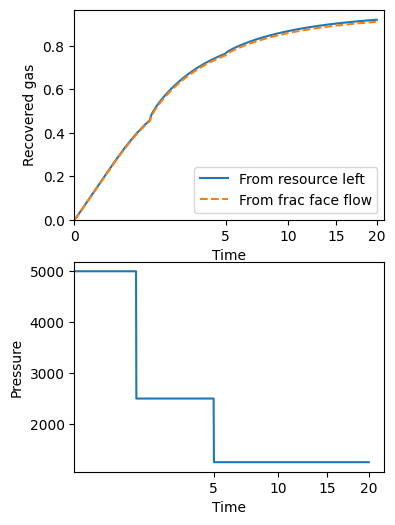
fig, (ax1, ax2) = plt.subplots(2, 1)
fig.set_size_inches(4, 6)
ax1.plot(time, 1 - remaining_gas, label="From resource left")
ax1.plot(time, recovery, "--", label="From frac face flow")
ax1.legend()
ax1.set(
    xlabel="Time",
    ylabel="Recovered gas",
    ylim=(0, None),
    xscale="squareroot",
    xlim=(0, None),
)

ax2.plot(time, pressure_v_time, label="Pressure")
ax2.set(xlabel="Time", xscale="squareroot", ylabel="Pressure");
mf = 0.09720937870967307
CPU times: user 2.03 s, sys: 5.49 ms, total: 2.03 s
Wall time: 2.04 s
0.3642368902150243
pseudopressure_fracface=array(0.09720938) 0.0008833922400551281 Deviation is  -1%
Build PVT data
There are two ways to create the necessary pressure-volume-temperature data.
Use the well data and an appropriate equation of state
Pull data from a pre-made csv file.
We will show both with the next code cell.
# #########################
# Haynesville shale gas play
# Using the well data and bluebonnet.fluids
# #########################
field_values = {
    "N2": 0.0,
    "H2S": 0.0,
    "CO2": 0.0002,
    "Gas Specific Gravity": 0.58,
    "Reservoir Temperature (deg F)": 285.21375,
}
gas_dryness = "wet gas"
pvt_gas = build_pvt_gas(field_values, gas_dryness)


# #########################
# Or, you could using pre-gathered pvt data
# #########################
# pvt_gas = pd.read_csv("https://raw.githubusercontent.com/frank1010111/bluebonnet/main/tests/data/pvt_gas_HAYNESVILLE%20SHALE_20.csv", index_col=0)

print(pvt_gas.head())
   temperature  pressure   Density  z-factor  compressibility  viscosity  \
0    285.21375      10.0  0.021024  0.999592         0.100043   0.014638
1    285.21375      20.0  0.042065  0.999181         0.050043   0.014638
2    285.21375      30.0  0.063123  0.998775         0.033376   0.014639
3    285.21375      40.0  0.084198  0.998370         0.025043   0.014639
4    285.21375      50.0  0.105290  0.997967         0.020042   0.014640

   pseudopressure
0        0.000000
1    20508.736605
2    54702.013998
3   102589.697359
4   164181.289746
Fit wells
well_number = "20"
prod_file = f"https://raw.githubusercontent.com/frank1010111/bluebonnet/main/data/dataset_1_well_{well_number}.csv"
# This file contains pressure and production data. Rows 1 and 2 have information about units, so skip
prod = pd.read_csv(prod_file, skiprows=[1, 2]).rename(
    columns={
        "Time (Days)": "Days",
        "Gas Volume (MMscf)": "Gas",
        "Calculated Sandface Pressure  (psi(a))": "Pressure",
    }
)[["Days", "Gas", "Pressure"]]
# This file contains an estimate of initial pressure. That's all I need it for here.
well_file = f"https://media.githubusercontent.com/media/frank1010111/bluebonnet/main/data/WellData_{well_number}.csv"
pressure_initial = float(
    pd.read_csv(well_file)
    .set_index("Field")
    .loc["Initial Pressure Estimate (psi)"]
    .iloc[0]
)

result = fit_production_pressure(
    prod,
    pvt_gas,
    pressure_initial,
    n_iter=40,
    pressure_imax=12000,
    filter_window_size=30,
    inplace_max=100000,
)
result
Fit Statistics
| fitting method | Nelder-Mead | |
| # function evals | 41 | |
| # data points | 416 | |
| # variables | 3 | |
| chi-square | 52336113.5 | |
| reduced chi-square | 126721.824 | |
| Akaike info crit. | 4890.88497 | |
| Bayesian info crit. | 4902.97702 |
Variables
| name | value | initial value | min | max | vary |
|---|---|---|---|---|---|
| tau | 829.929628 | 830 | 30.0000000 | 830.000000 | True |
| M | 52545.0889 | 13864.498560000016 | 13850.5730 | 100000.000 | True |
| p_initial | 10403.8830 | 10000.0 | 9539.17738 | 12000.0000 | True |
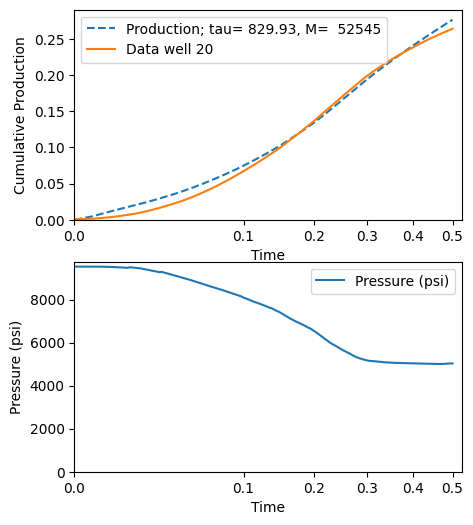
Plot the result
fig, (ax1, ax2) = plot_production_comparison(
    prod,
    pvt_gas,
    result.params,
    filter_window_size=30,
    well_name=f"Data well {well_number}",
)